AI Face Restoration
Rebuild facial details in blurry, low-resolution, or damaged photos using the CodeFormer model — the same tech behind professional photo restoration services.
Bring faded, low-resolution, and blurry photos back to life with our free online AI photo enhancer. Sharpen faces, upscale resolution up to 4x, and recover details you thought were lost forever — powered by CodeFormer face restoration.
Free • No signup • JPG, PNG, WebP up to 10MB
or browse files
Supports JPG, PNG, WebP • Max 10MB
Restore damaged memories, sharpen soft selfies, and upscale product photos with deep-learning models trained on millions of faces and natural images.
Rebuild facial details in blurry, low-resolution, or damaged photos using the CodeFormer model — the same tech behind professional photo restoration services.
Sharpen out-of-focus, motion-blurred, or compressed images in seconds. Our enhancer reconstructs missing detail rather than just boosting contrast.
Increase image resolution up to 4 times the original size without pixelation. Perfect for printing, large displays, or sharpening old family portraits.
Improve clarity and detail in the background while preserving the main subject. Great for landscapes, real estate, and travel photos.
No signup, no watermarks, no install. Upload, enhance, and download in your browser — most images complete in under a minute.
Your photos are processed to produce your enhanced result and are not used to train any model. You stay in control of your own images.
Three simple steps turn a blurry or low-quality photo into a sharp, high-resolution image.
Drag and drop a JPG, PNG, or WebP image up to 10MB into the upload area, or click to browse your files. The image stays in your browser until you submit it.
Choose face restoration, background enhancement, face upsampling, your upscale factor (1x–4x), and the fidelity slider to balance realism vs. detail.
Our AI processes your image using CodeFormer. When it's done, drag the comparison slider to see the difference and download the result as a WebP.
From heirloom family photos to product listings, the AI Image Enhancer adapts to your use case.
Recover grandparents' faded wedding photos, childhood portraits, and vintage prints that have been damaged by time.
Bring group photos, scanned albums, and printed memories back to a quality worth sharing with the next generation.
Sharpen interior and exterior shots taken on older phones so your listings look clean, professional, and consistent.
Upscale product images for crisp zoom-in views, larger storefronts, and high-resolution marketing materials.
Rescue slightly out-of-focus selfies and group shots before they hit your feed, and upscale for crisp Instagram or TikTok visuals.
Reconstruct faces in scanned daguerreotypes, tintypes, and old yearbook portraits to identify ancestors and preserve history.
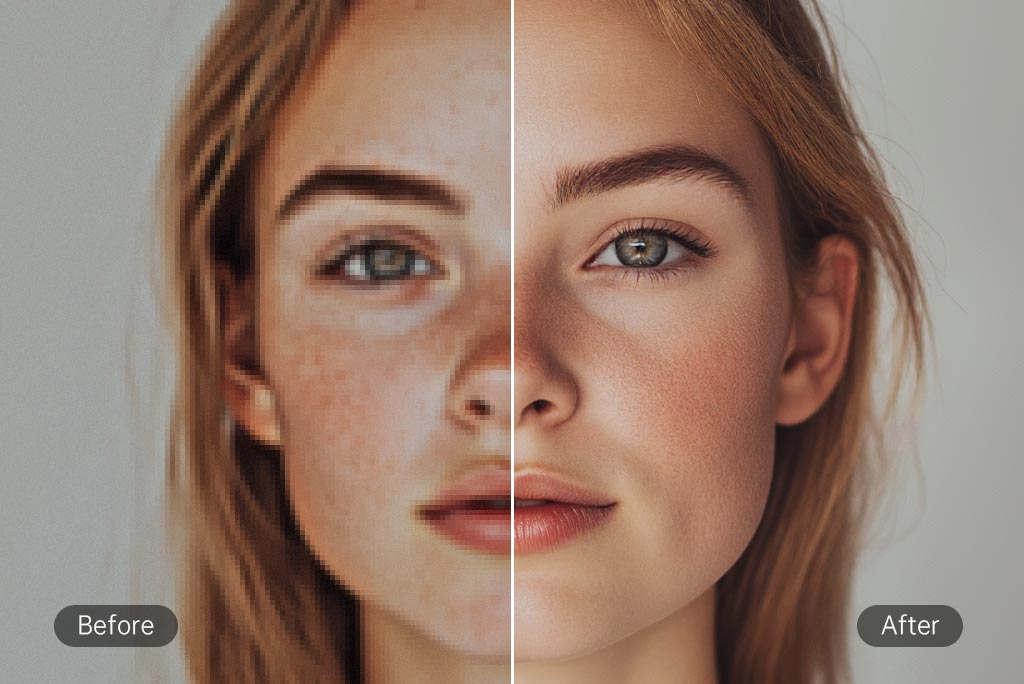
A real result from our AI Image Enhancer — a blurry, low-quality input on the left and the restored, sharpened output on the right. Drag the slider in the live tool to try your own photo.
Everything you need to know about the AI Image Enhancer.
An AI image enhancer is a tool that uses artificial intelligence to automatically improve photo quality. It can restore old, blurry, or low-resolution photos by sharpening details, upscaling resolution, and reconstructing faces using models like CodeFormer.
Yes. The AI Image Enhancer is free to use online. There is no signup required — simply upload your image, choose your settings, and download the enhanced result.
You can upload JPG, PNG, and WebP images up to 10MB. The enhancer works best on photos that contain faces, but it also improves backgrounds, landscapes, and general image clarity.
Face restoration uses a deep learning model called CodeFormer. It detects faces in your image, reconstructs missing or blurred facial details, and produces a sharper, more realistic version while preserving identity.
Yes. Choose an upscale factor between 1x and 4x to increase your photo's resolution. The AI adds realistic detail during the upscale so the final image stays sharp instead of looking pixelated.
Your photos are processed to generate the enhanced version and are not used to train any models. Always review the privacy policy of any online tool before uploading sensitive images.
Restore your first photo in under a minute. No signup, no watermark, no install.
Upload & Enhance